
You can download driving licence online in a few minutes using DigiLocker or the mParivahan app, both run by the Government of India. A digital driving licence stored in these apps is legally valid, so you can show it to traffic police instead of carrying the physical card.
Many people lose their DL card, forget it at home, or simply want a backup on their phone. Instead of applying for a duplicate licence immediately, you can download driving licence details and show them anywhere in India. This guide explains three easy ways to do it, when a digital DL is accepted, how to check DL status on Parivahan, and how to fix common errors.
Table of Contents
Is a Digital Driving Licence Valid?
Yes. The Ministry of Road Transport and Highways (MoRTH) has clarified that driving licences and vehicle registration certificates shown through DigiLocker or mParivahan are valid, and the Central Motor Vehicles Rules were amended to recognise documents in electronic form. Traffic police and transport officers can verify them digitally.
Important points to remember:
- A photo or scanned PDF of your DL saved in your gallery is not the same as a DigiLocker or mParivahan document. Always show the licence inside these official apps.
- The digital licence is fetched directly from the government database, so it is always up to date.
- If your physical DL is lost, you should still apply for a duplicate, but the digital copy keeps you covered in the meantime.
What You Need Before You Start
– Your driving licence number, in the format used by your state, for example KL0720150012345. – Your date of birth as on the licence. – A mobile number for app registration. For DigiLocker, an Aadhaar-linked number is best. – Details on your DL should match your Aadhaar, especially your name.
Method 1: Download Driving Licence Using DigiLocker
DigiLocker is the most popular way to download driving licence and store it safely.
Step 1: Install DigiLocker
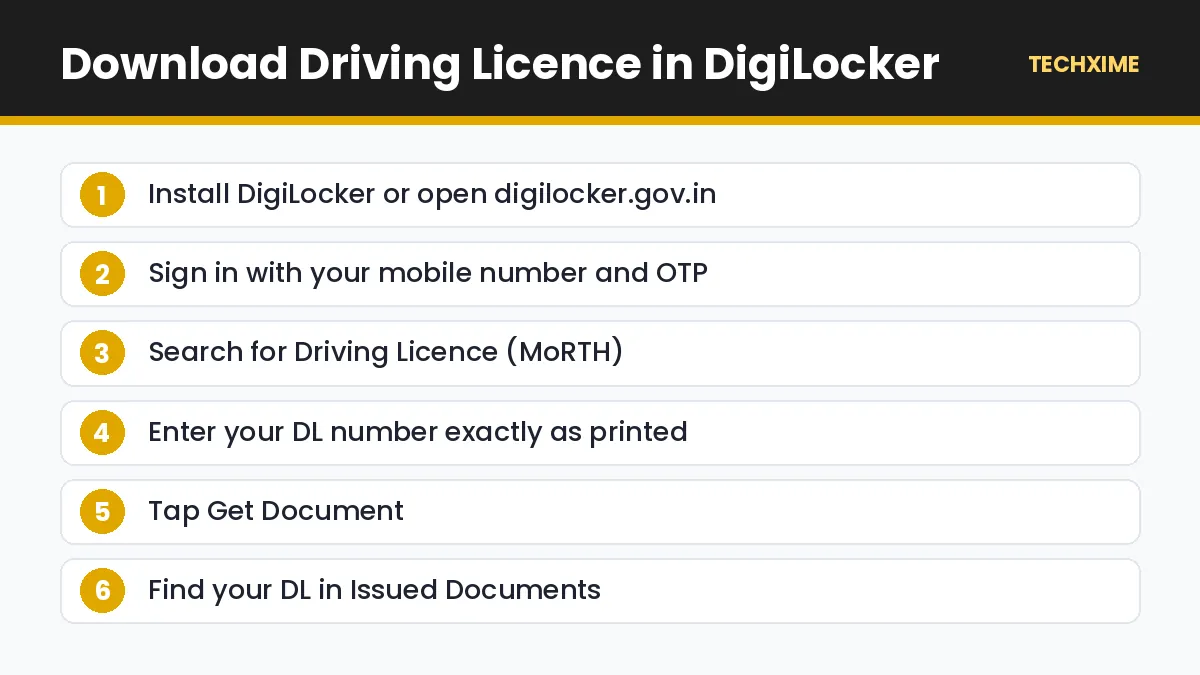
Download the DigiLocker app from the Google Play Store or Apple App Store, or visit digilocker.gov.in.
Step 2: Sign Up or Sign In
Create an account using your mobile number and verify with OTP. Link your Aadhaar for better access to issued documents.
Step 3: Search for Driving Licence
Tap Search Documents and type Driving Licence. Select Ministry of Road Transport and Highways.
Step 4: Enter Your DL Number
Enter your driving licence number exactly as printed, including state code and year.
Step 5: Fetch the Document
Tap Get Document. DigiLocker will fetch your licence from the national database.
Step 6: View or Save
Your DL now appears in Issued Documents. You can view it, download a PDF or share it when needed.
Method 2: Download Driving Licence Using mParivahan
mParivahan is MoRTH’s official app for driving licence and vehicle services.
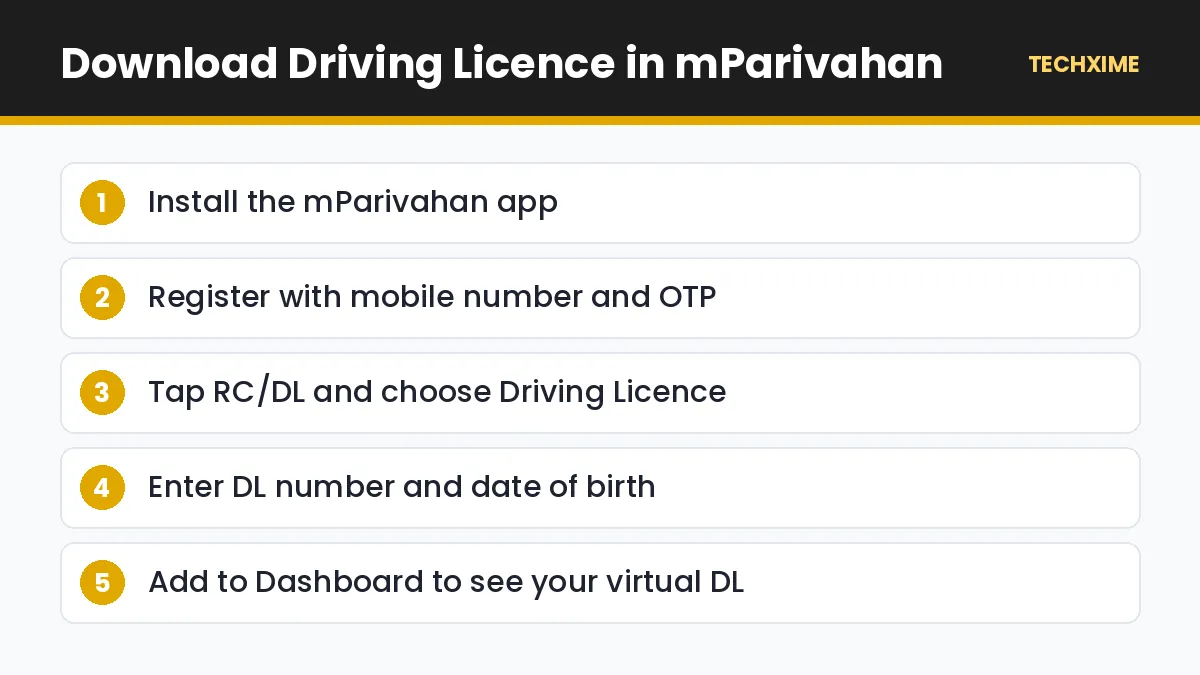
- Install mParivahan from the Play Store or App Store.
- Register using your mobile number and OTP.
- Tap RC/DL and choose Driving Licence.
- Enter your DL number and date of birth.
- Tap Add to Dashboard.
- Your virtual driving licence appears with a QR code that officials can scan.
mParivahan also shows your vehicle RC, lets you check vehicle details, and provides challan and road safety services.
Method 3: Check Driving Licence Status on Parivahan
If you want to confirm that your licence is valid or check its expiry date, use the Parivahan Sarathi portal.
- Visit parivahan.gov.in and open Online Services > Driving Licence Related Services.
- Select your state.
- Click Services on DL (Renewal/Duplicate/AEDL/IDP/Others) or the DL Status option.
- Enter your DL number and date of birth.
- View the licence status, validity, vehicle classes and issuing authority.
Some states also provide a printable DL extract on Sarathi. Availability depends on your state transport department.
DigiLocker vs mParivahan
| Feature | DigiLocker | mParivahan |
|---|---|---|
| Documents supported | DL, RC, Aadhaar, PAN, marksheets and more | DL and RC |
| QR code verification | Yes | Yes |
| Offline access | Downloaded PDF | Limited |
| Vehicle services | No | Yes, including RC details and challans |
| Best for | Storing all documents in one place | Traffic checks and vehicle services |
Many drivers use both apps. DigiLocker keeps your identity documents together, while mParivahan is handy on the road.
How to Get a Duplicate Driving Licence
If your physical DL is lost or damaged:
- File a police complaint or FIR for the lost licence if your state requires it.
- Visit parivahan.gov.in and choose Apply for Duplicate DL under your state’s Sarathi services.
- Fill in the form, upload documents and pay the fee.
- Book a slot at the RTO if required, or wait for the card to be posted, depending on your state.
How to Renew a Driving Licence Online
A private driving licence is generally valid until the holder turns 40, or for 20 years from issue, whichever comes first. After that, renewal is needed at intervals. To renew:
- Go to Sarathi on parivahan.gov.in.
- Choose your state and select Services on DL.
- Select Renewal of DL.
- Upload a medical certificate (Form 1A) if required due to age.
- Pay the fee and complete any RTO visit if your state requires it.
Common Errors and Fixes
“No Record Found”
Check the DL number format. Older licences may need to be converted to the new format, sometimes with a space or dash removed. If the licence is very old or handwritten, contact your RTO to digitise it in the Sarathi database.
Name Mismatch in DigiLocker
If your DL name does not match your Aadhaar name, DigiLocker may refuse to fetch the document. Update the mismatched record at the RTO or UIDAI.
Mobile Number Not Linked
Some states require a registered mobile number on your DL. Update it on Parivahan using the Mobile Number Update option under DL services.
App Showing Expired Licence
Your licence may be due for renewal. Check the validity on Sarathi and renew online.
Other Useful Vehicle Services
Once your DL is in DigiLocker or mParivahan, these guides will help you manage everything else:
- Check and pay pending fines with our guide to check challan online.
- Look up vehicle details with our guide on vehicle owner details.
- Save on highway tolls with the FASTag annual pass.
Understanding Your Driving Licence Number
Most people fail to download driving licence because they enter the number in the wrong format. A typical Indian DL number follows this pattern:
| Part | Example | Meaning |
|---|---|---|
| State code | KL | Kerala |
| RTO code | 07 | Issuing RTO |
| Year of issue | 2015 | Year the licence was issued |
| Serial number | 0012345 | Unique number |
So KL07 20150012345 is often entered as KL0720150012345, without spaces. If one format does not work, try with a space or hyphen after the RTO code.
Vehicle Classes on Your Licence
When you download driving licence, you will see vehicle classes such as:
- MCWG: Motorcycle with gear.
- MCWOG: Motorcycle without gear, such as scooters.
- LMV: Light motor vehicle, such as cars.
- LMV-NT: Light motor vehicle, non-transport.
- TRANS: Transport vehicles, such as trucks and buses.
Make sure the classes shown match the vehicles you drive. Driving a vehicle not covered by your licence can lead to fines and insurance claim problems.
Traffic Checks: What to Show
When stopped by traffic police, open DigiLocker or mParivahan and show your licence and vehicle RC. Officers can scan the QR code to verify details. Keep your phone charged, and download documents in advance so they are available even with a weak network. Insurance and PUC certificates can also be stored in DigiLocker where available.
Quick Summary: Download Driving Licence
– The fastest way to download driving licence is through DigiLocker or mParivahan. – You need your DL number and date of birth to download driving licence details. – A licence shown inside these apps is valid for traffic checks under MoRTH rules. – Use Parivahan Sarathi to check validity, renew or apply for a duplicate. – If you cannot download driving licence data, check the number format or contact your RTO.
Download Driving Licence: State-Specific Notes
All states use the national Sarathi database, but a few practical differences exist:
- Kerala, Karnataka, Tamil Nadu and most states: Licences are fully available in DigiLocker and mParivahan.
- Older handwritten licences: Must first be converted to a smart card or digitised at the RTO before you can download driving licence details online.
- Licences issued in another state: Remain valid across India. You only need to update your address if you want the licence to show your new state.
If your licence number starts with an old format, such as a number without a state code, visit your RTO and request “DL backlog entry” to add it to the Sarathi database.
Learner’s Licence and New Driving Licence
If you are applying for the first time, you can do everything online on Sarathi:
- Apply for a learner’s licence and complete the online test where available.
- Download the learner’s licence PDF after passing the test.
- After 30 days, apply for a permanent driving licence and book a driving test slot.
- After passing the test, your licence is issued and posted to you.
- Once issued, you can download driving licence details into DigiLocker and mParivahan.
International Driving Permit (IDP)
Planning to drive abroad? You can apply for an International Driving Permit through Sarathi under Services on DL. You need a valid Indian driving licence, passport, visa and a medical certificate if required. An IDP is usually valid for one year and must be carried along with your Indian licence.
Keep Your Licence Details Updated
If you move to a new address or change your mobile number, update your licence records on Sarathi under Services on DL. Updated records mean faster renewals, correct challan notices and fewer problems when you download driving licence details into DigiLocker. You should also check that your name matches your Aadhaar, since mismatches are the most common reason apps fail to fetch licences.
Frequently Used Parivahan Services
– DL status and validity check. – Renewal and duplicate licence. – Change of address. – International Driving Permit. – Challan payment through eChallan.
Most of these can be completed online, with an RTO visit only when biometrics or a test are required.
Key Terms Explained
– MoRTH: Ministry of Road Transport and Highways, which issues licence rules. – Sarathi: The national database and portal for driving licences. – mParivahan: MoRTH’s official app for licences and vehicle registration. – DigiLocker: The government’s digital document wallet. – RTO: Regional Transport Office, which issues and renews licences. – IDP: International Driving Permit for driving abroad.
Final Checklist
1. Keep your DL number and date of birth ready. 2. Download driving licence into DigiLocker and mParivahan. 3. Check validity on Parivahan Sarathi. 4. Update address or mobile number if needed. 5. Renew online before the licence expires.
Real-Life Examples
Anil forgot his wallet: He was stopped at a traffic check but had already chosen to download driving licence details into mParivahan. The officer scanned the QR code, and Anil continued his journey without a fine.
Sneha lost her licence card: She fetched her licence in DigiLocker the same day and later applied for a duplicate card on Sarathi. Until the new card arrived, she used the DigiLocker copy.
Vijay had an old licence: DigiLocker showed “No record found”. His RTO digitised the licence into the Sarathi database, and he could then download driving licence details normally.
Expert Tips
– Download driving licence details into both DigiLocker and mParivahan for backup. – Keep your phone charged during long drives so you can show digital documents. – Store your vehicle RC, insurance and PUC in the same apps. – Set a reminder a few months before your licence expires. – Check your licence classes before driving a new type of vehicle. – Never share OTPs with people claiming to be RTO agents.
Frequently Asked Questions
How can I download driving licence online?
Install DigiLocker or mParivahan, search for Driving Licence, enter your DL number and date of birth, and fetch the document.
Is a DigiLocker driving licence valid for traffic police?
Yes. MoRTH recognises driving licences shown through DigiLocker and mParivahan as valid.
Can I download driving licence PDF?
Yes. DigiLocker allows you to download a PDF of your driving licence from the Issued Documents section.
Can I show a photo of my DL on my phone?
A photo or scan in your gallery is not the same as an official digital document. Show the DL inside DigiLocker or mParivahan instead.
What if my DL is not found in DigiLocker?
Check the number format. If the licence is old, visit your RTO to update it in the Sarathi database.
Can I renew my licence online?
Yes. Most states allow online renewal through the Sarathi portal, with a medical certificate for older drivers.
Staying Updated
Transport rules are becoming more digital every year, so it makes sense to download driving licence. Official processes, fees and timelines can change over time.
Save this page, share it with family members who may need help, and read our other step-by-step guides on Techxime for Aadhaar, PAN, banking, vehicles and smartphones. If something in the process looks different on the official website, follow the latest instructions shown there, because government portals sometimes change their menus and button names without notice.
Family members who drive your vehicles should also keep their own licences in DigiLocker or mParivahan. It takes only a few minutes per person and avoids trouble during checks, insurance claims or accidents, when officers may ask to see the driver’s licence immediately.
Remember that a digital licence is only as useful as the phone that carries it. Keep DigiLocker and mParivahan signed in, update the apps regularly, and check once in a while that your licence still loads correctly, so you are never caught off guard at a checkpoint.
Conclusion
It is quick and easy to download driving licence online in 2026. Add your DL to DigiLocker or mParivahan, and you will always have a valid digital copy on your phone. Use the Parivahan Sarathi portal to check validity, renew your licence or apply for a duplicate. With your documents in these official apps, a forgotten wallet will never cause trouble at a traffic check again.