
If you filed your income tax return for FY 2025-26 and are waiting for money back, checking your ITR refund status online takes less than two minutes. The Income Tax Department shows the refund amount, the processing stage and the date it was credited on its e-filing portal, while Protean (formerly NSDL) shows the bank-side payment status.
This year many taxpayers filed early, and a large number of refunds have already been paid. But some people are still waiting because of e-verification gaps, bank account errors or mismatches in reported income. This guide shows three easy ways to check ITR refund status for AY 2026-27, explains what each status message means, and lists nine proven fixes if your refund is delayed.
Table of Contents
Important ITR Dates for AY 2026-27
Before checking your ITR refund status, it helps to know the key deadlines for this year.
| Return Type | Due Date |
|---|---|
| ITR-1 and ITR-2 (non-audit) | July 31, 2026 |
| ITR-3 and ITR-4 (non-audit) | August 31, 2026 |
| Audit cases | October 31, 2026 |
| Belated or revised return | December 31, 2026 |
If you missed the original deadline, you can still file a belated return until December 31, 2026, with a late fee under Section 234F of ₹1,000 (income up to ₹5 lakh) or ₹5,000 (above ₹5 lakh). You can still claim a refund in a belated return.
When Will You Get Your Income Tax Refund?
A refund is processed only after your return is verified and processed by the Centralised Processing Centre (CPC). In most simple cases, refunds are credited within a few weeks of e-verification. Returns with complex income, large deductions or mismatches take longer.
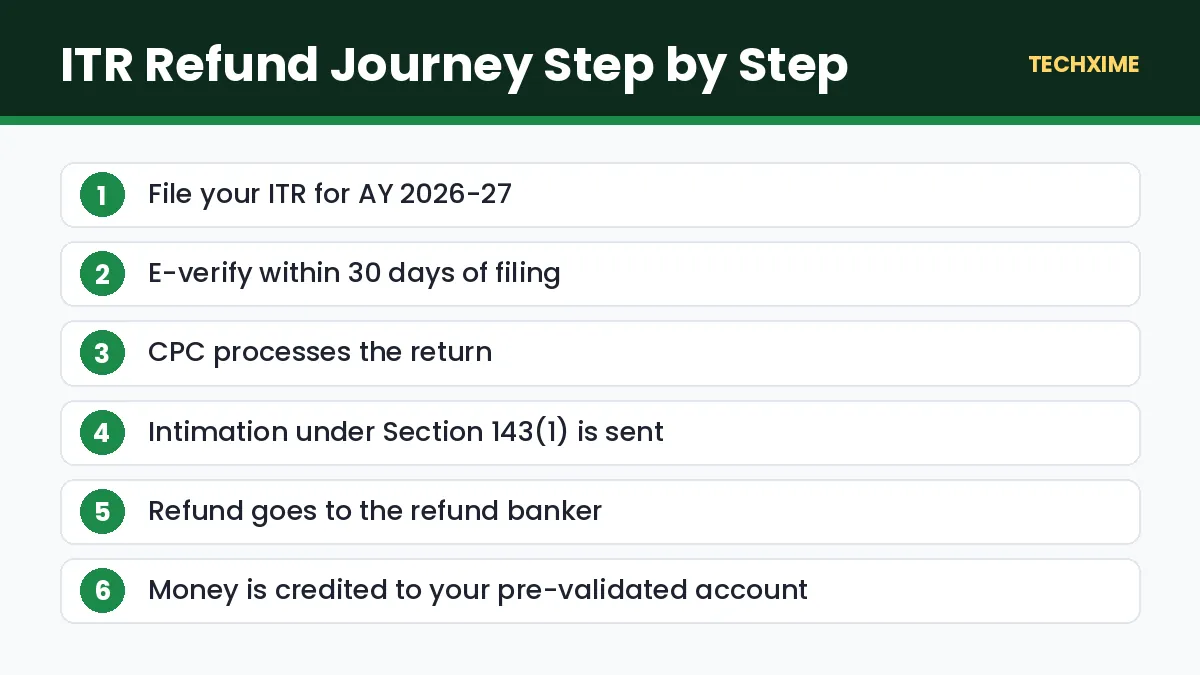
The refund journey usually looks like this:
- You file the return.
- You e-verify it (within 30 days of filing).
- CPC processes the return and sends an intimation under Section 143(1).
- The refund is sent to the refund banker (SBI).
- The amount is credited to your pre-validated bank account.
Method 1: Check ITR Refund Status on the E-Filing Portal
This is the most complete way to check ITR refund status.
Step 1: Log In
Go to the Income Tax e-filing portal and log in using your PAN or Aadhaar and password.
Step 2: Open Filed Returns
Click e-File > Income Tax Returns > View Filed Returns.
Step 3: Select AY 2026-27
Find the return for Assessment Year 2026-27 and click View Details.
Step 4: Read the Status Timeline
You will see each stage, such as “Return filed”, “Return verified”, “Processing completed” and “Refund issued”, along with dates and the refund amount.
Method 2: Check ITR Refund Status Without Login on Protean
Protean’s refund tracking page shows whether the refund was sent from the refund banker.
- Visit the Protean (NSDL) TIN refund status page.
- Enter your PAN.
- Select Assessment Year 2026-27.
- Enter the captcha and submit.
The page shows the mode of payment, date of credit and any failure reason. Note that data appears here only after the refund has been sent to the refund banker, usually around ten days after processing.
Method 3: Check Refund Details in Your Email and SMS
After processing, CPC sends an intimation under Section 143(1) to your registered email. It shows the tax computed by the department, the refund due and any adjustments. You also get an SMS when the refund is credited. Search your inbox for “Intimation u/s 143(1)” to find it.
ITR Refund Status Meanings Explained
The ITR refund status message tells you exactly where your money is. Here is what the common messages mean.
| Status | Meaning | What to Do |
|---|---|---|
| Return submitted and verified | Waiting for CPC processing | Wait; no action needed |
| Processed with refund due | Refund approved and being sent | Wait a few days for credit |
| Refund issued | Money sent to your bank | Check your bank statement |
| Refund failed | Bank credit failed | Fix bank details and request reissue |
| Processed with no demand and no refund | Tax paid equals tax due | Nothing to receive |
| Processed with demand due | You owe tax | Check intimation and respond |
| Adjusted against outstanding demand | Refund used to clear old tax dues | Check the demand; respond if incorrect |
| Defective return notice | Return has errors | Respond under Section 139(9) within the time given |
9 Common Reasons Your Refund Is Delayed (and How to Fix Them)
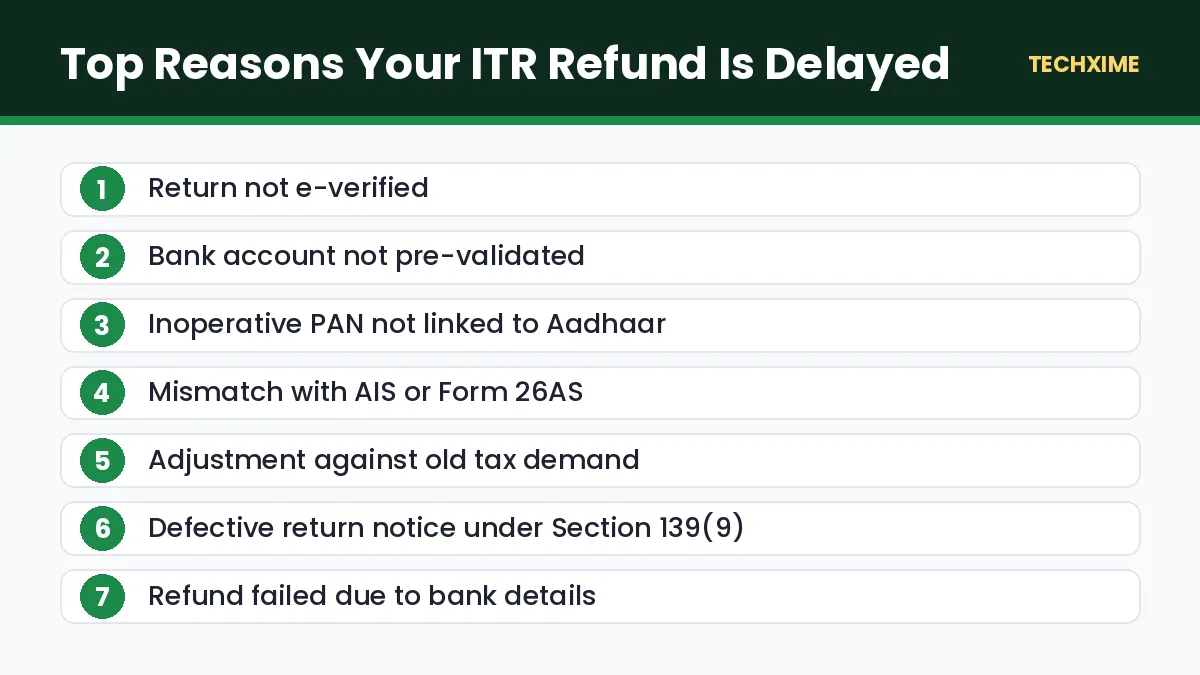
If your ITR refund status has not changed for weeks, one of these issues is usually the cause.
1. Return Not E-Verified
A return that is not verified is treated as not filed. E-verify using Aadhaar OTP, net banking or a bank account EVC. If you missed the 30-day window, submit a condonation request.
2. Bank Account Not Pre-Validated
Refunds only go to a pre-validated bank account linked to your PAN. Go to My Profile > My Bank Account and validate your account.
3. Name or PAN Mismatch in Bank Records
If the name in your bank account does not match your PAN, the credit may fail. Update your KYC with the bank.
4. Inoperative PAN
If your PAN is not linked to Aadhaar, it becomes inoperative and refunds are not issued. Learn how to check PAN Aadhaar link status and fix it.
5. Mismatch With AIS or Form 26AS
If income or TDS in your return does not match the Annual Information Statement or Form 26AS, CPC may hold or reduce the refund. Compare your return with AIS and file a revised return if needed.
6. Outstanding Tax Demand
The department can adjust your refund against earlier unpaid demands under Section 245. You will usually receive a notice first. Check Pending Actions > Response to Outstanding Demand and agree or disagree with reasons.
7. Defective Return Notice
If your return has an error, you will receive a notice under Section 139(9). Respond within the given time, or the return may be treated as invalid.
8. Return Selected for Further Review
Some returns with high refunds or large deductions are picked for closer checks. Keep proofs of deductions and respond quickly to any notice or email from the department.
9. Refund Failed Due to Bank Issues
Closed accounts, wrong IFSC codes or frozen accounts lead to failed refunds. Update your details and file a Refund Reissue Request under Services on the e-filing portal.
How to Raise a Refund Reissue Request
If your ITR refund status shows “Refund failed”, follow these steps:
- Log in to the e-filing portal.
- Go to Services > Refund Reissue.
- Click Create Refund Reissue Request.
- Select the return and choose a pre-validated, EVC-enabled bank account.
- Verify using Aadhaar OTP or EVC and submit.
The refund is usually reissued within a few weeks.
Will You Get Interest on a Delayed Refund?
Yes. Under Section 244A, the department pays simple interest of 0.5% per month on the refund amount, usually calculated from April 1 of the assessment year if you filed on time. This interest is taxable as “Income from Other Sources” in the year you receive it.
Tips for a Faster Refund Next Year
– File early, ideally in June or July once Form 16 and AIS are available. – E-verify immediately using Aadhaar OTP. – Keep one bank account pre-validated and EVC-enabled. – Match your income with AIS before filing. – Claim only deductions you can prove. – Keep your mobile number updated in Aadhaar so OTPs work. See how to update mobile number in Aadhaar.
Beware of Refund Scam Messages
Fraudsters send SMS and emails saying “Your income tax refund of ₹15,490 is approved, click here to update your account”. The Income Tax Department never asks for card details, PINs or OTPs by SMS or email. Always check your ITR refund status only on the official e-filing portal.
How to Read Your Section 143(1) Intimation
The intimation under Section 143(1) is the most important document for understanding your ITR refund status. It compares your figures with the department’s calculation. Here is how to read it:
- Column for taxpayer figures: Shows the income, deductions and tax you reported.
- Column for department figures: Shows the amounts computed by CPC.
- Differences: Any difference in income, deductions or TDS is highlighted.
- Net amount: At the bottom, you will see whether a refund is due, a demand is raised, or both are nil.
If the department has allowed a smaller refund than you claimed, the difference is usually due to a TDS mismatch, a disallowed deduction or an arithmetic correction. If you disagree, you can file a rectification request under Section 154 on the e-filing portal.
How to File a Rectification Request
1. Log in to the e-filing portal. 2. Go to Services > Rectification. 3. Click New Request and select the assessment year. 4. Choose the type of request, such as tax credit mismatch correction or reprocessing of return. 5. Submit the corrected details and verify.
Rectification is useful when the department has made an error in processing. If you made the mistake yourself, a revised return, filed before December 31, 2026, is usually the better option.
ITR Refund Status for Old Years
You can also check refunds for earlier years on the e-filing portal. Go to View Filed Returns and select the relevant assessment year. If an old refund failed and was never reissued, raise a Refund Reissue Request. For very old cases, you may need to contact your jurisdictional Assessing Officer.
Who to Contact for Refund Problems
– Income Tax e-filing helpdesk: Use the contact numbers listed on the e-filing portal under Contact Us. – CPC Bengaluru: For processing-related questions. – e-Nivaran grievance: Log in, go to Grievances, and submit a refund-related complaint with details.
Keep your acknowledgment number, PAN and assessment year ready when you contact support about your ITR refund status.
ITR Refund Status Examples
Here are a few common real-life cases and what they mean:
- Filed in June, refund received in July: A typical case for salaried taxpayers with matching Form 16 and AIS.
- Filed in July, still “Return verified” in September: Processing may be pending. Check for mismatches in AIS and make sure your bank account is validated.
- Refund amount lower than expected: Read the Section 143(1) intimation. The department may have adjusted a TDS mismatch or disallowed a deduction.
- Status says refund issued, but money not received: Confirm the account number on Protean’s refund status page and check with your bank. If the account was closed, raise a refund reissue request.
In every case, the e-filing portal and your intimation email give the clearest picture of your ITR refund status.
Documents to Keep Handy While Tracking Your Refund
– ITR acknowledgment (ITR-V) with acknowledgment number. – Form 16 from your employer and Form 16A for other TDS. – Annual Information Statement (AIS) and Form 26AS. – Proofs of deductions claimed under Section 80C, 80D and others. – Bank account details that are pre-validated on the portal.
Keeping these in one folder makes it easy to answer any query and speeds up any correction if your ITR refund status shows an issue.
Old Regime vs New Regime and Your Refund
Your choice of tax regime affects the size of your refund. Under the new regime, most deductions are not allowed, so refunds usually arise only when excess TDS was deducted. Under the old regime, deductions such as 80C and home loan interest can create larger refunds if your employer did not account for them. Choose the regime that gives lower tax, and make sure your claims are backed by documents.
Key Terms Explained
– CPC: Centralised Processing Centre in Bengaluru that processes returns. – Section 143(1) intimation: The department’s summary of your processed return. – AIS: Annual Information Statement showing income and transactions reported about you. – Refund banker: The bank (SBI) that sends refunds to taxpayers. – Refund reissue: A request to resend a refund that failed. – Section 244A: The rule that provides interest on delayed refunds.
Final Checklist
1. Confirm your return is e-verified. 2. Pre-validate your bank account on the e-filing portal. 3. Check ITR refund status on the portal and Protean. 4. Read the Section 143(1) intimation carefully. 5. Respond to any notice or demand quickly. 6. Raise a refund reissue request if the refund failed.
Expert Tips
– Check your ITR refund status once a week instead of daily; processing happens in batches. – Keep your email inbox clean so CPC intimations do not land in spam. – Respond to every notice within the deadline to avoid refund adjustments.
Frequently Asked Questions
How can I check ITR refund status for AY 2026-27?
Log in to the e-filing portal and go to e-File > Income Tax Returns > View Filed Returns, or check the Protean refund status page using your PAN and assessment year.
How long does an ITR refund take?
Most simple refunds are credited within a few weeks of e-verification. Complex returns or mismatches can take longer.
Why is my ITR refund status showing “processed with no refund”?
It means your tax paid equals the tax due as computed by the department. Check the Section 143(1) intimation for details.
Can I check ITR refund status without login?
Yes. Use the Protean refund status page with your PAN and assessment year once the refund has been sent to the refund banker.
Do I get interest on a delayed refund?
Yes. You get simple interest of 0.5% per month under Section 244A, which is taxable.
What should I do if my refund failed?
Validate your bank account on the e-filing portal and raise a Refund Reissue Request under Services.
Conclusion
Checking your ITR refund status is quick and easy through the e-filing portal or Protean. If your refund is delayed, the reason is usually simple: a pending e-verification, a bank account that is not pre-validated, an inoperative PAN or a mismatch with AIS. Fix the issue, raise a reissue request if needed, and your refund, along with any interest due, should reach your account soon.